Set up iCloud Mail forwarding
Use iCloud Mail rules to forward sale emails from each marketplace you sell on.
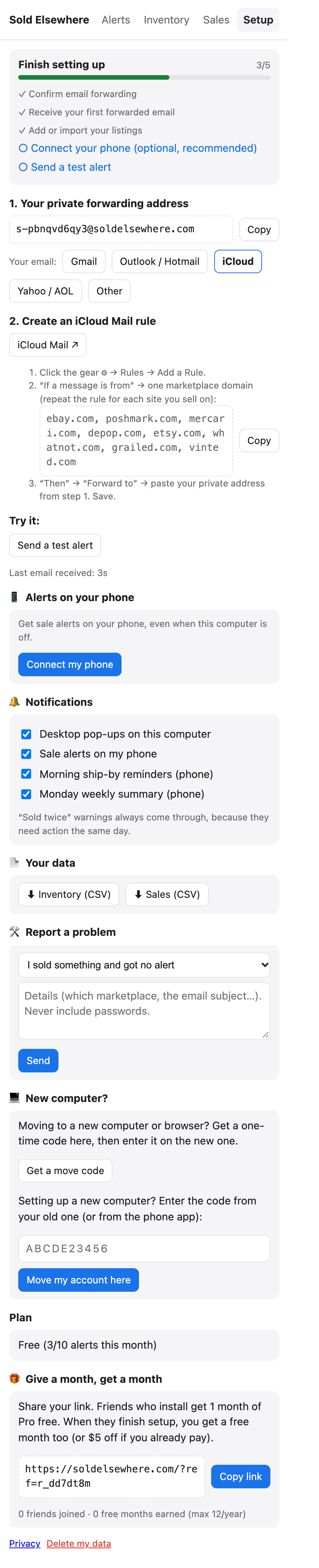
For @icloud.com, @me.com and @mac.com addresses. In the extension choose iCloud under “Your email” in Setup.
Steps
- Copy your private address from Setup → 1.
- Go to icloud.com/mail on a computer and sign in.
- Click the gear ⚙ (or …) → Rules → Add a Rule.
- If a message: “is from” → type one marketplace domain, for example
poshmark.com. - Then: “Forward to” → paste your private address.
- Click Done.
- Repeat for every marketplace you sell on (iCloud allows one sender per rule):
ebay.com,mercari.com,depop.com,etsy.com, and so on.
iCloud doesn’t ask for a confirmation code. Click Send a test alert in the extension to check notifications.
Notes
- Rules created on iCloud.com work on all your Apple devices.
- Rules apply to new mail only.
Still stuck? Email hello@soldelsewhere.com. A real person replies within 2 business days, in English or Spanish.