Understanding sale alerts
What each part of an alert means, what the End buttons do, and the warnings you might see.
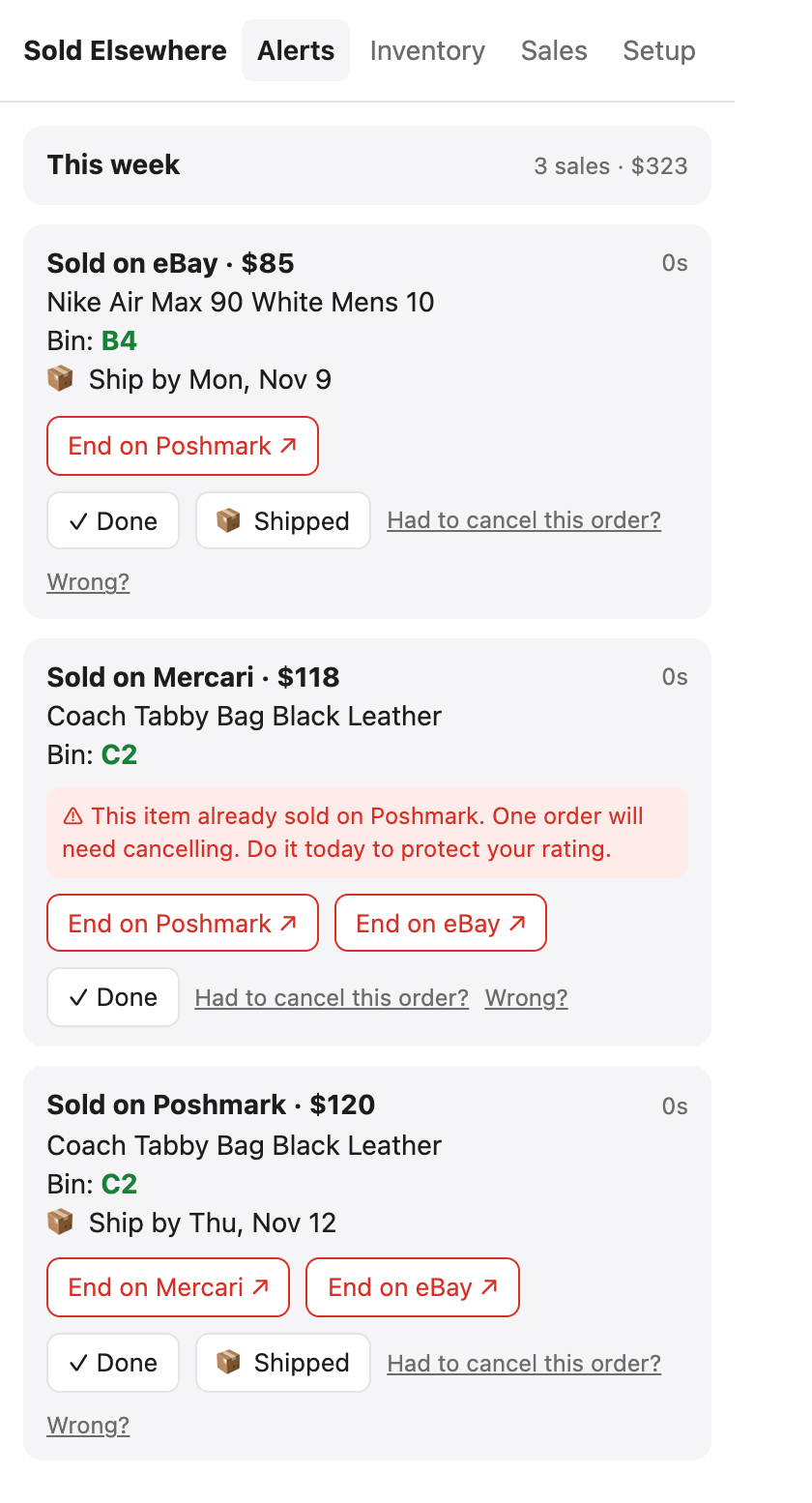
Where alerts appear
- A desktop notification the moment the sale email reaches us, while your browser is open (delivered instantly by push, with a backup check every few minutes).
- A red badge on the extension icon with the number of open alerts.
- The Alerts tab in the extension.
- Your phone, if connected, even when the computer is off.
Parts of an alert
| You see | Meaning |
|---|---|
| Sold on Poshmark · $120 | Where it sold and the price from the sale email |
| Bin: C2 | Where you store it (from your inventory) |
| 📦 Ship by Thu, Nov 12 | Shipping deadline from the sale email. See Ship-by reminders |
| End on Mercari ↗ | Opens that listing so you can end or delete it yourself |
| ✓ Done | Hides the alert from your open count once you’ve ended the other listings |
| 📦 Shipped | Marks the order shipped so reminders stop |
| Had to cancel this order? | Records a cancellation for your cancellation meter |
“Not in your inventory. Check these sites”
We couldn’t match the sale to an item, so the links go to your listings page on each site you sell on. Import your listings to get exact links.
⚠ “We couldn’t confirm this email really came from…”
Real marketplace emails carry a digital signature. If a “sale” email fails that check, it could be a fake meant to trick you into ending a real listing. Check the sale in the marketplace’s own app before ending anything. Unverified emails never move items to Sold.
⚠ “This item already sold on…”
The same item has now sold on two sites. See It sold twice: what to do.
Free plan limit
The Free plan includes 10 sale alerts a month. After that, alerts still arrive but show “Upgrade to see this sale” until next month or until you upgrade.
Still stuck? Email hello@soldelsewhere.com. A real person replies within 2 business days, in English or Spanish.